Author: admin

  • 停电时智能门锁还能用吗?古晋锁匠告诉你

    停电时智能门锁还能用吗?古晋锁匠告诉你

    停电时智能门锁还能用吗?简单答案:大多数可以。智能门锁靠锁里的电池,不靠家里的电,所以停电时密码、指纹、门卡和钥匙照常能开门。会停的,主要是要靠 Wi-Fi 的手机功能。

    2025年7月3日下午2点46分,古晋很多地区突然停电。Sarawak Energy 说,一名承包商挖地时,弄坏了 Green Heights 附近两条高压地下电缆。BDC、Stampin、Stutong、Batu Kawa 和 3rd Mile 一些地方都没电,Sarawak General Hospital、Aeon Mall 和 The Podium 也一样。Sarawak Energy 的运营部门 SESCO 改用另一条线路供电,下午2点58分恢复供电(Sarawak Energy)。

    遇到这种停电,很多人会问:停电时智能门锁还能用吗?这篇文章用简单的话告诉你:停电后哪些功能会停,哪些照常能用,门锁电池没电了怎么办,还有买电子锁之前要检查什么。

    停电时,智能门锁哪些功能会停?

    门锁本身不会停。会停的是网络。家里的 Wi-Fi 路由器(Wi-Fi 盒)是用家里的电。一停电,Wi-Fi 也跟着断。所以这些功能可能会停:

    • 人不在家时,用手机远程开门
    • 有人开门时,手机收到通知
    • 在外面远程改密码

    门锁品牌也是这样说的。EZVIZ 是一个智能家居品牌。它说,没有 Wi-Fi 或路由器没电时,它的 App 不能发开门通知,也不能远程控制门锁,要等电来了才行(EZVIZ)。美国门锁品牌 Schlage 也提醒:如果智能门锁靠 Wi-Fi 或手机数据连接,停电时“不一定所有通讯或功能都能用”(Schlage support)。

    实用小贴士: 千万不要把手机 App 当成唯一的开门方法。更多内容可以看这篇英文文章:Do smart locks work without Wi-Fi?(英文)

    停电时,电子锁哪些功能照常能用?

    其实智能门锁是用锁里自己的电池,不是用家里的电。所以停电时,密码、指纹、门卡和机械钥匙都照常能开门。

    想象一下:你回到家,伸手按指纹,整栋楼黑漆漆的。你的电子门锁是不是也”死”了?不会。智能门锁不用家里的电,大多数完全靠锁里的电池运作。所以指纹和密码键盘照样能用。

    欧洲一个制定电子产品标准的机构,为智能门锁写了一份指南。指南说,停电时,用户一定要能锁门或开门,可以靠电池,也可以靠机械钥匙。指南也说,停电或断网时,锁着的门应该继续锁着,只有有权限的人才能改变(European smart lock guide)。简单来说:停电不应该让你的门自己打开。

    实用小贴士: 确保家里每个人不用手机也能进门。给每个人设自己的密码、指纹或门卡。

    电子门锁没电了怎么办?

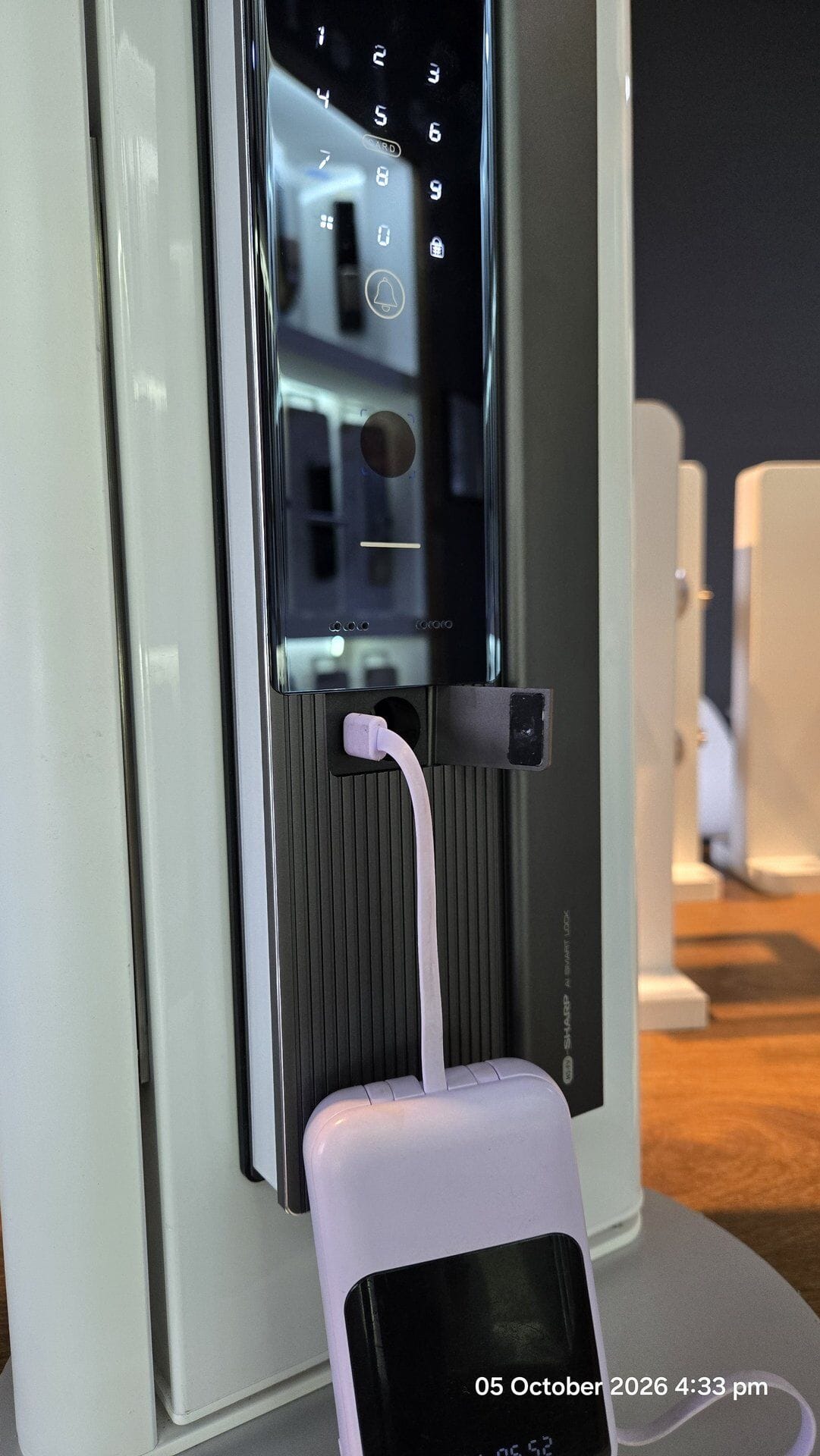
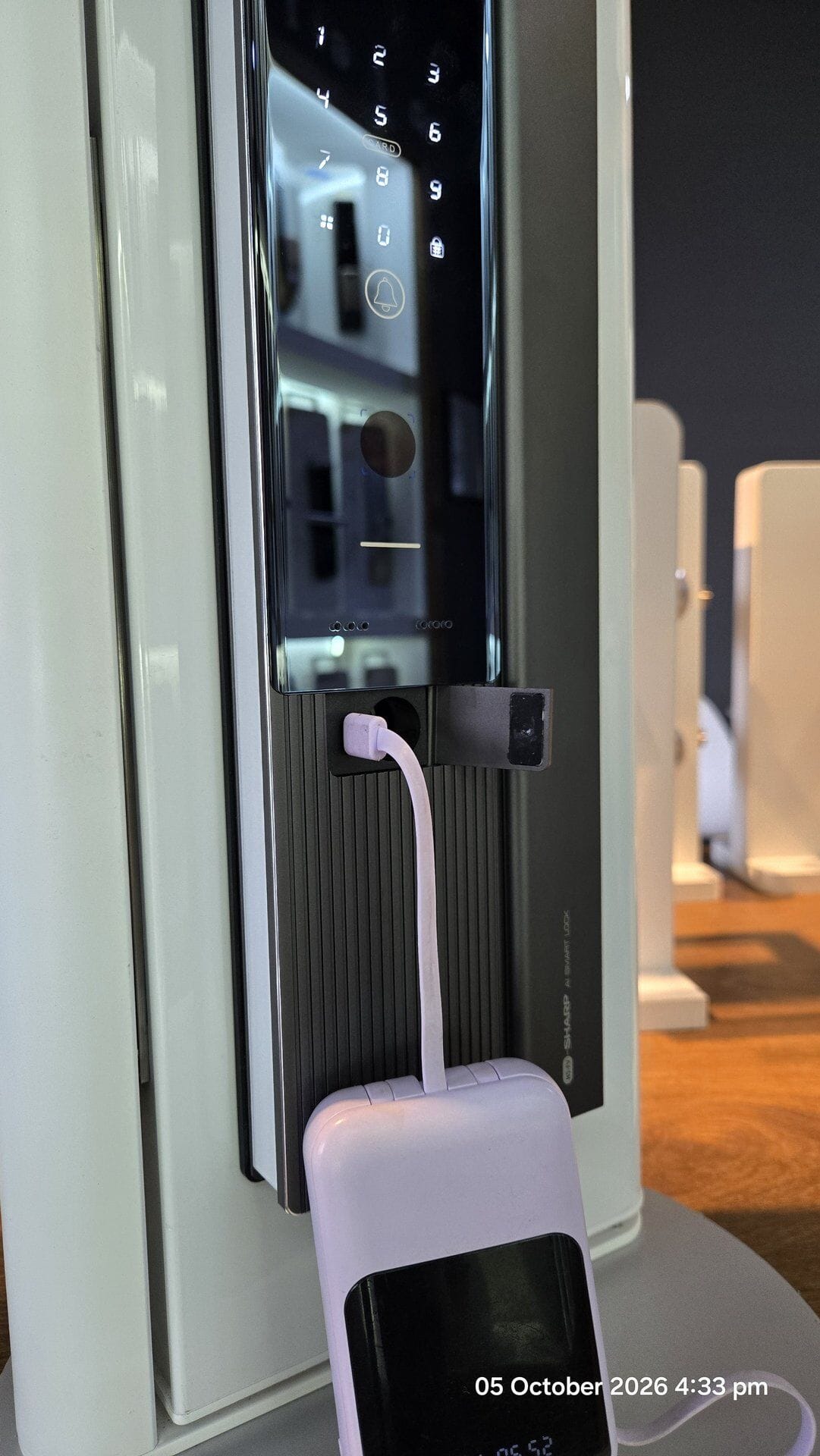
    如果门锁电池也没电,键盘就不会亮。但你不会被锁在外面。很多门锁都有后备方法:机械钥匙、可以插充电宝(power bank)的 USB-C 接口,或者两个可以接 9V 电池的金属点。

    2026年9月28日,新加坡义顺一座组屋发生了一件事。Mothership 引述《新明日报》报道,这家人的电子门锁好像没电了。一名13岁男孩和朋友从楼梯间爬出去,想从窗口进屋,但进不去,结果被困在外面的边缘上。新加坡民防部队(SCDF)用梯子把他们救下来,没有人受伤。之后,这家人换了门锁电池(Mothership)。

    电池没电,是锁匠常接到的问题。一名新加坡锁匠告诉 CNA,她每天至少接到一通智能门锁故障的电话,大多数是因为电池出了问题(CNA)。

    那要怎么进门?每把锁不一样,请先看说明书。Kaadas 说,它的门锁电量低时会闪灯和发出”哔哔”声。没电时,可以像给手机充电一样,插上 Type-C 充电宝,或用机械钥匙开门(Kaadas Malaysia)。Yale 的 YDM4109 说明书里有紧急钥匙,也有一个可以接 9V 碱性电池的紧急供电点(Yale YDM4109 manual)。EZVIZ 也说,很多型号外面都有电源接口,可以接充电宝(EZVIZ)。

    实用小贴士: 门锁一提醒电量低,就马上换电池。要用碱性电池(alkaline),不要用便宜的电池,因为它可能漏液,弄坏门锁的电路板。原因可以看这篇英文文章:Avoid using “heavy duty” batteries for your digital door lock(英文)。机械钥匙要放在一个从外面拿得到的安全地方,不要放在屋里。

    买智能门锁之前要检查什么?

    先问卖家一个简单的问题:”如果停电,门锁电池也没电,这扇门要怎么开?”然后检查这五点:

    1. 用自己的电池。 问它用什么电池,电量低时会怎样提醒你。
    2. 不用 App 也能开。 关掉 Wi-Fi,密码、指纹或门卡都应该能开门。
    3. 有后备供电点。 可以插充电宝的 USB-C 接口,或接 9V 电池的金属点。问清楚是哪一种,在哪个位置。
    4. 有机械钥匙。 所有电都没了,这是你最后的后备。
    5. 在店里试一试。 请卖家关掉 Wi-Fi,然后让你看每一种开门方法都能用。

    实用小贴士: 如果卖家没办法清楚回答这五点,就换一把锁看看。

    最后的小提醒

    偶尔把 Wi-Fi 路由器的插头关掉十分钟,然后用家人平时的每一种方法开门试试。今天也找一找你家门锁的后备供电点在哪里,看看它要用 9V 电池还是 USB-C 线。在平常的日子先学会,总比在黑漆漆的走廊才来想办法好。

    实用小贴士: 不确定你的门锁停电时会怎样?想找适合自己的智能门锁推荐?欢迎联系古晋 Fine Lock Shop,或来我们的展示厅看看。想了解智能门锁安全不安全,可以看这篇英文文章:Are smart door locks safe? A straight answer from a Kuching locksmith(英文)。

    联系我们

    • WhatsApp:082-288422
    • 电邮:finelockshop@gmail.com
    • 展示厅地址:Ground Flr, Lot 4863, Jalan Datuk Amar Kalong Ningkan, 93250 Kuching (3rd Mile / 三哩)
    • 营业时间:星期一至五 9:00am–5:30pm;星期六 9:00am–2:00pm

    常见问题 (FAQ)

    停电时智能门锁还能开吗?

    能。大多数智能门锁靠锁里的电池,不用家里的电,所以密码、指纹、门卡和机械钥匙照常能开门。

    停电时门会自己打开吗?

    不应该。欧洲的智能门锁指南说,停电或断网时,锁着的门应该继续锁着。

    停电时还能用手机 App 开门吗?

    远程开门可能不行。家里的 Wi-Fi 路由器也没电,所以远程开门、开门通知和远程改密码都可能会停。

    电子门锁没电了怎么办?

    先看门锁说明书。很多电子锁可以插充电宝到 USB-C 接口,或接 9V 电池到紧急供电点,也可以用机械钥匙开门。

    智能门锁 / 指纹锁要用什么电池?

    用碱性电池,不要用便宜的电池,因为它可能漏液,弄坏门锁电路板。门锁一提醒电量低,就要马上换。

  • Will a Smart Lock Still Work During a Blackout? A Kuching Locksmith Explains

    Will a Smart Lock Still Work During a Blackout? A Kuching Locksmith Explains

    On 3 July 2025, at 2.46pm, the power went off in many parts of Kuching. Sarawak Energy said a contractor’s digging damaged two high-voltage underground cables near Green Heights. Parts of BDC, Stampin, Stutong, Batu Kawa and 3rd Mile lost power. So did Sarawak General Hospital, Aeon Mall and The Podium. SESCO, Sarawak Energy’s operations arm, brought power back through another source at 2.58pm (Sarawak Energy).

    A power cut like this raises a fair question. What happens to a smart lock when the power goes out? In this post, we explain what a smart lock power outage really means. What stops. What still works. What to do if the lock battery dies. And what to check before you buy.

    What stops working when the power is out?

    The lock itself does not stop. What stops is the internet link. Your Wi-Fi box at home (the router) runs on house power. When the power goes, your Wi-Fi goes too. So these features can stop:

    • Opening the door with your phone when you are far away
    • Alerts on your phone when someone opens the door
    • Changing codes from far away

    Lock brands say the same thing. EZVIZ is a smart home brand. It says that without Wi-Fi or router power, its app cannot send entry alerts. It also cannot control the lock from far away, until the power comes back (EZVIZ). Schlage, a US lock brand, warns the same. If a smart lock talks through Wi-Fi or phone data, “not all communication or features may be available” in a power outage (Schlage support).

    Practical takeaway: Never make the phone app the only way into your home. We explain more in Do smart locks work without Wi-Fi?

    What still works during a blackout?

    A smart door lock actually runs on its own batteries, not on house power. So in a digital lock blackout, the keypad, fingerprint, card and metal key still work.

    You come home, reach for the fingerprint reader, and the whole building is dark. Is your smart lock dead too? No. Smart locks do not use your home’s electricity. Most run fully on batteries inside the lock. So fingerprints and keypads keep working.

    A European group that sets rules for electronic products wrote a guide for smart door locks. It says a user must be able to lock or unlock the door when power is lost. The lock can do this with batteries or a metal key. The guide also says a locked door should stay locked during a power or internet cut. Only an allowed user should change that (European smart lock guide). In simple words: a smart door lock power cut should not open your door.

    Practical takeaway: Make sure everyone at home can get in without a phone. Give each person their own PIN, fingerprint or card.

    What if the lock battery also runs out?

    Then the keypad goes dark. But you are not stuck. Many locks have a backup. It can be a metal key, a USB-C slot for a power bank, or two metal points for a 9V battery.

    On 28 September 2026, two boys got stuck on a ledge in Yishun, Singapore. It was at a public housing block. Mothership, quoting Shin Min Daily News, reported the story. The family’s electronic door lock had apparently run out of battery. A 13-year-old and his friend climbed out of the stairwell. They tried to get into the flat through a window, but could not. Firefighters from the SCDF brought them down with a ladder. No one was hurt. The family changed the lock’s batteries after that (Mothership).

    Flat batteries are a common call for locksmiths. One Singapore locksmith told CNA she gets at least one call a day about faulty smart locks. She said these are mostly because the batteries had failed (CNA).

    So how do you get in? It depends on your lock, so check its user guide. Kaadas says its locks flash a light and beep when batteries are low. When they are flat, plug in a Type C power bank, like charging a phone. Or you use the metal key (Kaadas Malaysia). Yale’s guide for its YDM4109 lock shows an emergency key. It also shows an emergency power point for a 9V alkaline battery (Yale YDM4109 manual). EZVIZ says many models have an outside power port for a power bank (EZVIZ).

    Practical takeaway: Change the batteries as soon as the lock warns you. Use alkaline batteries, not “heavy duty” ones, which can leak and damage the lock’s circuit board. We explain why in Avoid using “heavy duty” batteries for your digital door lock. Keep the metal key in a safe place you can reach from outside, not inside the house.

    What should I check before buying?

    Ask one simple question: “If the power and the lock batteries are both gone, how do I open this door?” Then check these five points:

    1. Runs on its own batteries. Ask what batteries it uses. Ask how it warns you when they are low.
    2. Opens without the app. PIN, fingerprint or card should open the door with the Wi-Fi off.
    3. A backup power point. A USB-C slot for a power bank, or 9V battery points. Ask which one it has, and where it is.
    4. A metal key. This is your last backup if all power fails.
    5. Test it in the shop. Ask the seller to switch off the Wi-Fi. Then ask to see each way of opening work.

    Practical takeaway: If a seller cannot answer these five points clearly, look at another lock.

    Closing tip

    Once in a while, switch off your Wi-Fi box at the plug for ten minutes. Then open your door in every way your family uses. Also find your lock’s backup power point today. Check what it needs: a 9V battery or a USB-C cable. It is better to learn this on a calm day than in a dark corridor.

    Practical takeaway: Not sure how your lock handles a power cut? WhatsApp us at 082-288422, email finelockshop@gmail.com, or visit our showroom at Ground Flr, Lot 4863, Jalan Datuk Amar Kalong Ningkan, 93250 Kuching (3rd Mile). For the bigger safety picture, read Are smart door locks safe? A straight answer from a Kuching locksmith.

  • Do Smart Locks Work Without Wi-Fi? A Kuching Locksmith Explains

    Do Smart Locks Work Without Wi-Fi? A Kuching Locksmith Explains

    In this post, we explain four things. What stops working without Wi-Fi. What still works. What real cases teach us. And what to check before you buy.

    What stops working without Wi-Fi?

    Some features need the internet. They work through the lock company’s computers on the internet. We call these computers “servers”. Without Wi-Fi, these features stop:

    • Opening the door with your phone when you are far away
    • Alerts on your phone
    • Adding or changing codes from far away
    • Voice control, such as Amazon Alexa or Google Assistant

    Schlage is a lock brand. Its help page shows this clearly. Sometimes its Encode Wi-Fi locks lose their Wi-Fi link. Then the app shows “Unreachable”. Schlage says you may not be able to lock or unlock from far away. You may not be able to manage codes in the app. You may also stop getting alerts (Schlage support).

    August is another US smart lock brand. It says the same thing in its product table. Opening from far away “Requires Wi-Fi Connection”. Control by Alexa and Google Assistant also “Requires Wi-Fi” (August: How it works).

    So, do smart locks need Wi-Fi? Only for these extras from far away. The lock itself is a different story.

    Practical takeaway: Before you buy, list the features you really need. Maybe you never open the door for anyone from far away. Then you may not need a Wi-Fi lock at all.

    What still works when the Wi-Fi is down?

    Anything saved inside the lock keeps working. That means PIN codes, fingerprints, cards and the normal metal key. Your phone can also still open some locks when you stand near the door. It uses Bluetooth, a short-distance link between phone and lock.

    This works because many locks save your codes and fingerprints inside the lock, not on the internet.

    Yale’s user guide for its YDM4109 digital lock is one example. It shows how to save up to 100 fingerprints and 100 PIN codes. You do this on the lock itself. The Bluetooth part for the Yale app is extra. You buy it only if you want it. The guide also lists an emergency metal key. It also shows a spot to touch a 9V battery if the lock’s batteries run flat (Yale YDM4109 manual). So this lock is a smart lock without internet from the start. You add the internet link only if you want it.

    Lockly is a smart lock brand from the USA (Lockly). Its help page says your fingerprints are saved on the lock itself. They are saved in a secret code form, not as pictures (Lockly support).

    The August table also shows that every August lock can open by Bluetooth when you stand near it. No internet is needed (August: How it works).

    Europe also has a written guide for smart door locks. It is called ETSI TS 103 815. It says a smart lock must keep working at the door when the internet is lost. It must also go back to normal when the internet comes back (ETSI TS 103 815). In simple words: no internet should not mean no entry.

    Practical takeaway: Give every family member their own PIN or fingerprint on the lock. Then nobody needs only the phone app to get in. Worried about hacking? A lock that never goes online is harder to attack. We explain this in Can a smart door lock be hacked?

    Can a smart lock fail because of Wi-Fi or internet problems?

    Yes, the smart features can fail. App features work through the lock company’s servers. Sometimes those servers stop working. A well-made lock still opens at the door. A badly made lock can stop working at the keypad too. That is why a key or another backup is important.

    On 20 October 2025, Amazon’s internet computer service broke down. It is called Amazon Web Services, or AWS. Thousands of apps use it. When it broke, many apps could not reach their servers. So many smart home products stopped working. The news site Matter Alpha said the problem lasted about 15 hours. It started at one of Amazon’s big computer centres in the USA. Alexa and Ring went offline. But some homes had smart systems that work inside the house, without the internet. Matter Alpha said those homes “were unaffected”. Some SmartThings users could not use their phone app. But their automatic settings at home kept running (Matter Alpha).

    The LockState case in August 2017 was worse. LockState is a smart lock company. It sent a bad software update to its older 6000i Wi-Fi locks. The locks were also sold through an Airbnb program for hosts. About 500 locks were hit. The keypads stopped working. The locks could not connect to the company’s servers again. So the company could not fix them over the internet. Owners had to post part of the lock back for repair. That took 5 to 7 days. Or they could wait 14 to 18 days for a new one. The normal keys still worked (BleepingComputer). One Airbnb host kept his keys in a small key box in the hallway. He told TechCrunch he could still open his doors because of this (TechCrunch).

    The lesson from both cases is simple. You cannot control the internet. A smart door lock offline should still work as a lock.

    Practical takeaway: Choose a lock that opens without the app. Keep the metal key in a safe place you can reach from outside, like that host’s key box. Do you rent out a unit? Plan how guests can get in if the app stops working. Our Airbnb lock notes cover the basics.

    What should I check before buying?

    Ask one simple question: “If my internet is down, how do I open this door?” Then check these five points:

    1. PIN codes saved on the lock. PIN codes and fingerprints should be saved inside the lock, not only on the internet. The Yale and Lockly examples above work like this.
    2. A metal key and/or a 9V emergency battery point. The key is your last backup if the electronic parts fail. LockState owners learned this. The 9V point helps when the batteries are flat.
    3. Bluetooth for using your phone near the door. Bluetooth lets your phone talk to the lock directly, without internet.
    4. No internet needed to unlock. Ask the seller if any way of opening needs the company’s servers. The answer you want is “no”.
    5. Test every way of opening with the Wi-Fi off. Ask the seller to switch off the Wi-Fi. Then ask to see the PIN, fingerprint, card and key working.

    Practical takeaway: If a seller cannot answer these five points clearly, look at another lock.

    Closing tip

    Once in a while, switch off your home Wi-Fi for ten minutes. Then open your door in every way your family uses. If one way fails, you find out on a calm day. Not at midnight in the rain.

    Practical takeaway: Make this test a habit. For the bigger safety picture, read Are smart door locks safe? A straight answer from a Kuching locksmith.

  • Are Smart Door Locks Safe? A Straight Answer from a Kuching Locksmith

    Are Smart Door Locks Safe? A Straight Answer from a Kuching Locksmith

    If you are choosing a front door lock for a Kuching house, a shop, or choosing for a client’s unit, you have probably heard both extremes: “smart locks get hacked in seconds” and “smart locks are safer than keys.” Neither is accurate. You need the whole full story.

    This article sits next to our earlier article on whether a smart lock can be hacked. Here we answer are smart door locks safe, what smart door lock security actually rests on, and how a smart lock vs traditional lock choice looks like when you actually care about your doors as the person who stays behind the door, and not a sales pitch from a salesman’s perspective.

    Are smart door locks safe?

    Short answer: Yes, safe enough for ordinary homes and light commercial use—only if you choose a reputable brand (those that provide continuous updates for both software and firmware), install it on a solid door and frame, and manage PINs, cards, and guest access like you would manage spare keys. But…a smart lock is not magic armour. It is a lock added with electronics. One research used an “unsophisticated cyber attacker–burglar” to attack 18 domestic smart security devices (using 433 MHz radio, Bluetooth, and RFID). Out of 18 smart security device tested, the attack had worked on 16 of them! (89% successfully attacked!)

    Above case is a real published case: University of Hertfordshire researchers (Allen, Mylonas, Vidalis, and Gritzalis) built an “unsophisticated cyber attacker–burglar” model and tested domestic smart security devices over 433 MHz radio, Bluetooth, and RFID. At least one high-criticality attack worked against 16 of 18 devices. Their work produced 14 published CVEs. That is not a Kuching crime wave—it is a lab sample that shows many consumer products fail basic wireless checks. Source: Smart homes under siege…, Computers & Security (2024).

    Europe now treats residential smart door locks as higher-stakes consumer IoT. ETSI TS 103 815 V1.1.1 (January 2024) builds on ETSI EN 303 645 and asks for encrypted, authenticated communications, updatable software, a way to lock or unlock if power dies, and attention to mechanical security—not only the app. A later BLE study of 18 commercial locks found 14 still vulnerable to the attacks examined, with the authors stating the flaws could affect over 20 million users (IEEE TCE, Silent Intruders…). Those numbers describe tested products, not every lock sold in Sarawak. There is no honest public “hack rate” for Malaysian homes.

    Practical takeaway: Buy brands that still update firmware after the purchase, set a unique admin password (and 2FA where offered), keep the door and strike strong, and revoke guest access when people leave.

    Can a smart door lock be hacked?

    Short answer: Yes, in principle. That does not mean every terrace house on your street will be opened from a café Wi-Fi this week. Most published demos need proximity(near distance), special tools, or a weak product—not some random stranger on the street with only a phone number. But still, we want to be honest and tell you that hacking a smart lock is possible.

    In 2025, researchers at UC San Diego (paper at USENIX WOOT) reverse-engineered a very big and prominent Door Lock Brand – Master Lock Bluetooth Deadbolt D1000. They showed a nearby attacker could record a full BLE unlock session and replay it to open the lock again. They also showed a former guest could keep unlocking after access should have been revoked—Master Lock told them the D1000’s access profiles could remain valid for up to nine months because of an earlier clock-related firmware decision, with mitigations planned. Source: Diao et al., No Key, No Problem; summary: https://bit.ly/3VdVrre.

    Such ‘session reuse’ weakness is not unique to one brand. NIST’s entry for CVE-2022-46480 describes incorrect session management on another big brand, Ultraloq UL3 BT (2nd Gen, firmware 02.27.0012): an attacker in Bluetooth range could sniff unlock data and reuse it while the session stayed open. Companion technical report: arXiv:2312.00021. NCC Group’s work on Nuki products found issues that could let someone open or disrupt a lock; Nuki released patches (SecurityWeek coverage).

    Practical takeaway: How to realisticly lower the risk for you: patchable firmware, no shared admin PIN, guest codes that expire, and turning off always-on auto-unlock if you do not need it. Read more: Can a smart door lock be hacked?.

    Smart door lock security: what actually matters

    A smart door lock’s strength is dependent on 3 factor: the software—credentials, radio/app path, and the steel in the door. A good and strong advanced fingerprint reader – yes it is strong, but if the door lock latch is weak, the overall lock is still low security. A boring PINCODE lock, but the locking is a reinforced-multipoint-bolted lock on a solid door, this is be the safer choice.

    Also, the access card. The same Hertfordshire team’s technical report on a big lock brand, Yale’s Conexis L1 (CVE-2023-26941) shows how MIFARE Classic-class RFID tags can be cloned when an attacker gets brief physical proximity to the original card. Their write-up describes recovering keys and duplicating tags in about 20 seconds of access to the original tag (arXiv:2312.00021). Classic’s Crypto-1 cipher has been publicly broken since 2008; correctly configured DESFire EV2/EV3-class AES credentials are far harder to clone (overview).

    Some opinions believe the door lock can only be attacked by someone near the door lock. But distance is not really a deterrent. Attacker can attack a smart door lock even from overseas, even from 1,960KM away. In an ACM WiSec ’22 paper, Staat and colleagues used an analog bluetooth relay and unlocked a Nuki Smart Lock 2.0 while bridging about 65 m between the lock and an authorised phone (DOI 10.1145/3507657.3528536; arXiv:2202.06554). On the access-control side, researchers relayed HID Seos over the public Internet and unlocked a lab door with a card about 1,960 km away (ePrint 2023/450). Fox-IT’s advisory is blunt: treat passive proximity unlock with caution; prefer a deliberate tap/button, stronger ranging (e.g. UWB where available), or disable auto-unlock (Fox-IT).

    Fact with source: ETSI’s smart-lock vertical explicitly lists credential copy, replay, and relay among credential-related threats, and ties cyber rules to mechanical building-hardware practice (TS 103 815, threat notes and Annex C).

    Takeaways: For day-to-day smart door lock security in Kuching, we still care more about bolt throw, strike fit, humidity-tolerant hardware, and whether parts will still be available in five years—see why some locks are so cheap and five ways to tell a smart lock is good. ETSI also expects you can lock or unlock if power is lost (TS 103 815, SDL 5.9-1)—battery contacts and/or a mechanical key override. A weak cylinder becomes the weak link no matter how good the fingerprint module looks (fingerprint reader differences).

    Smart lock vs traditional lock

    Neither wins by default. A quality traditional cylinder on a reinforced door often beats a no-name “smart” lock with weak cards and no updates. A durable smart lock with deletable credentials, honest logs, and a proper install often beats a worn knobset and a key under the mat.

    Look again at the Master Lock D1000 findings: convenience features (temporary guest access, audit logs over BLE/phone) became attack surfaces when session handling and revocation were weak (WOOT paper). Traditional keys do not have that exact failure mode—but they also cannot revoke a copied key without a rekey. Different tools, different messes.

    ETSI frames residential smart locking as needing both cyber and mechanical controls (TS 103 815). Traditional mechanical locks have almost no internet attack surface; they still fail through picking, drilling, worn pins, or broken keys depending on the cylinder and bolt. Smart locks add PIN/card/phone revocation and optional entry logs—and add BLE, Wi-Fi, apps, and cloud paths that quality and patching decide. If you want mechanical-only options, start here: high-security mechanical door locks.

    What to check before you buy (Kuching homeowners & contractors)

    Short answer: Match the lock to the door, the people who need access, and who will service it in five years from now.

    1. Door type — Timber, metal, multipoint security door? Wrong body equals a weak install (smart locks on security/metal doors).
    2. Who comes and goes — Family only, staff codes, or short-term rental? Plan code rotation for Airbnb-style use (Airbnb lock notes).
    3. Brand support — Will firmware and spare parts still exist? (Korea-made durability; repair after years).
    4. Connectivity — Fully offline digital vs Bluetooth vs Wi-Fi. More connectivity means more account responsibility.
    5. Credentials — Deletable PINs and cards; ask what RFID tech the cards use; treat passive auto-unlock as optional.
    6. Backup — Mechanical key and/or external battery contacts; spare batteries on the shelf.
    7. Install — DIY only if the door already matches; mortise and security doors are easy to get wrong (DIY caveats).

    More selection context: How to choose the right smart door lock.

    Soft next step

    If you want a second pair of eyes on a model—or an install that respects latch, strike, and multipoint hardware—talk to Fine Lock Shop. We work with Kuching homeowners, shops, and project partners (contractors and interior designers). Browse https://bit.ly/4AFyVrE and smart digital door locks, or visit the showroom and ask us to explain trade-offs in plain language. We will not invent a “hack-proof” promise. We will help match risk, door, and budget honestly.

  • Using Card to “Slot-Open” a Door Lock is actually a Myth. Locksmith’s Insider Secret

    Using Card to “Slot-Open” a Door Lock is actually a Myth. Locksmith’s Insider Secret

    Kuching Locksmith Knowledge Sharing
    By Fine Lock Shop

    When you accidentally locked the door, and left the key still inside, what is the 1st t hing that you will think of?

    Try use a card to ‘slot’ open the lock. Actually everyone that i met, up to now, have all thought that the knob type of door lock can be just card-slot to open the door. And this is actually ‘fake news’.

    Knob lock or cylindrical lock, are designed to be not slot-able. Whenever you seen or heard people manage to use card to slot open a lock, is actually due to: IMPROPER INSTALLATION. When the lock is not properly installed, it will expose a weakness which is slot-able.

    Let me teach you now how to properly install a knob lock.

    First you need to understand that cylindrical latch, has 2 parts: The Latch itself, and a Deadlatch.

    This must be the first time you have heard of deadlatch. Maybe this is the first time you notice it. But it’s extremely important. If the deadlatch is pressed when the door is closed, the latch will be ‘deadened’. Hence the word DEAD-latch. So in a proper installation, the deadlatch is always pressed and can’t go into the door-frame hole.


    When you (or someone else) do the installation, you need a hole at the door frame, for the latch to go in:

    When you are measuring this hole and aligning this hole, the deadlatch CANNOT go into this hole, as shown below:


    Another photo below here to show you the 99% of installation that we saw (the wrong way)

    The main culprit is at the door frame hole (strike hole). just make sure that the deadlatch won’t go into hole. And this will guarantee your installation to be of higher security, and no one can just swipe a card to go into your house/ room.

    Lets Keep Our Families Safe.

  • Why a Smart Door Lock Is the Key to Modern Home Security

    Why a Smart Door Lock Is the Key to Modern Home Security

    You always forget your house key, kan? Or maybe takut orang masuk rumah curi-curi? Nowadays got one special thing — smart door lock — very easy, very safe!

    Apa itu Smart Door Lock? Smart door lock itu is like pintu punya kunci, tapi bukan pakai kunci biasa oh! Ini canggih, boleh buka guna telefon, tekan nombor, guna cap jari, ataupun kad saja. Ada yang boleh buka dari jauh, walaupun kau belum balik rumah lagi.

    Kenapa Best Guna Smart Door Lock?

    • Tak payah cari kunci, tekan saja kod atau guna phone.
    • Rumah lebih selamat, sebab smart lock ada alarm dan rekod siapa masuk keluar.
    • Senang share dengan family — semua boleh dapat kod atau cap jari sendiri.
    • Kalau busy, boleh buka pintu untuk orang lain dari tempat kerja atau kedai kopi saja!

    Cara Pilih Smart Door Lock Yang Quality Bagus

    • Pastikan sesuai dengan pintu rumah kau — yang kayu, besi, semua boleh.
    • Pilih function yang suka — nak tekan kod, guna cap jari, atau app phone.
    • Cari yang ada alarm dan backup bateri, confirm selamat.
    • Kalau boleh, ambil yang jenama besar sebab kualiti memang control tinggi, dan spare part senang cari. Macam beli kereta Toyota sebab banyak spare part dan tahan lasak.

    Siapa Patut Guna? Family kat rumah, budak hostel, boss kedai — semua boleh pakai. Senang, hati pun tenang.

    Smart door lock ni memang senang gila, kerja jadi cepat, hati pun aman. Nak tahu lebih, mahu tengok macam mana pasang? Call saja kami, boleh demo terus!

  • A relatively newcomer is smart door lock world, but is a big brand in CCTV. Is it good?

    A relatively newcomer is smart door lock world, but is a big brand in CCTV. Is it good?

    The distributor has been looking for us to help re-sell their smart door lock, as we’re the no.1 in Kuching. Not to say that we’re great and big, but that’s more like the tradition here already. You wana enter Kuching market on smart door lock, you somehow will get to know Fine Lock Shop and reputation.
    It’s also not easy to convince me to help resell any new brand. I have seen too many brands that are just trying to make money and make the smart lock with the cheapest material. So unless you are really good and somehow different, I usually don’t want to carry another brand. I have more than 10 brands to re-sell in my outlet. 

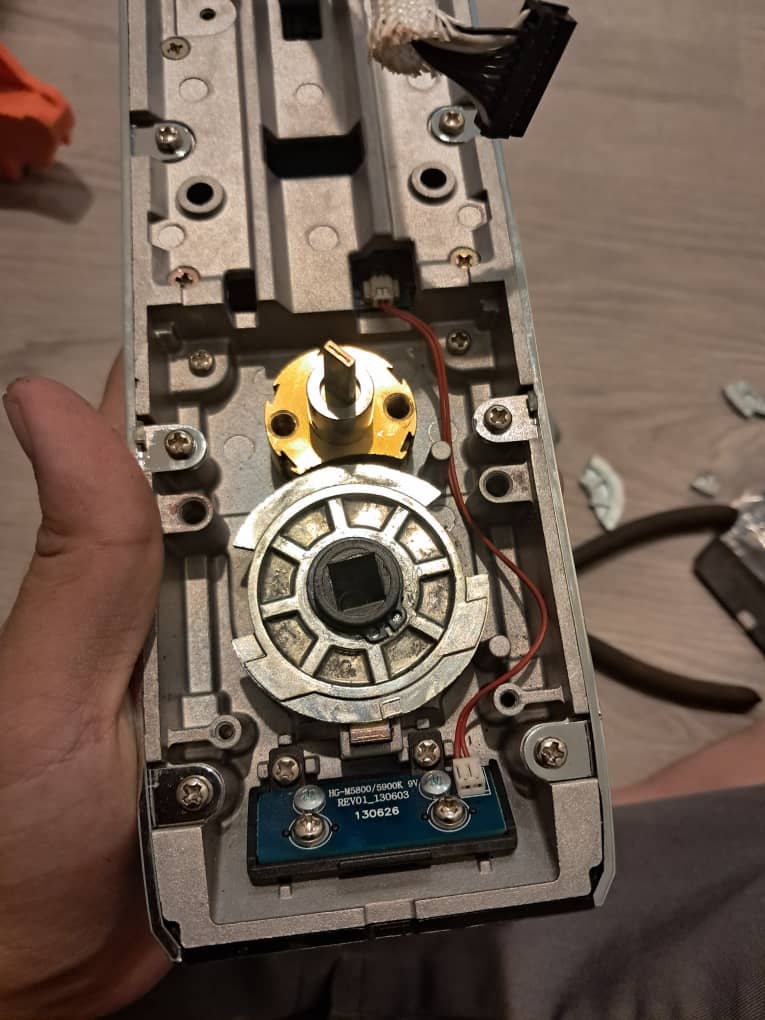
    But as i open and disassemble their lock, i can clearly see their quality. They are not the no.1 best smart door lock that i have seen, but is good enough. Above average. 

    And what stands out, is the smart door lock’s connection speed to the Wifi function. The server speed while using its online function and control. I think it’s not wrong to say that this is one of the fastest and smoothest WiFi control. Very little lag and “round rotating” icon coming out. You can set new pincode, fingerprint and card and remotely open, and the speed of interaction is very fast. For that, I agree to re-sell this brand. EZVIZ smart door lock.
    A good choice especially for those who already have, or is going to use EZVIZ branded CCTV. They are all using the same app. The company aspire to become the One-home-one-app brand.

  • If you believed that smart locks were solely focused on securing your door, you are mistaken

    If you believed that smart locks were solely focused on securing your door, you are mistaken

    Let us briefly discuss smart door locks and their multifaceted capabilities.

    A Status Symbol

    Smart door locks extend beyond their primary function of safeguarding homes. They have become a status symbol, akin to “What Car Are You Driving” and “What Watch Are You Wearing.” The distinction lies in the fact that these status symbols are only visible when individuals visit your homes.

    Enhanced Peace of Mind, Potential Challenges

    The convenience of smart locks eliminates the need to carry physical keys, providing a sense of peace of mind by reducing the constant worry about their loss.

    However, there are potential drawbacks to consider. If the smart lock encounters frequent issues, such as accidental alarm triggers, premature battery depletion, or persistent unlocking failures, the investment made in this technology may yield additional headaches. Instead of constantly worrying about keys, now you have to constantly worrying about battery level, about whether you can enter later, etc.

    That’s why, at my place in Kuching, I deeply emphasis getting a time-tested durable and problem free smart door lock. There are indeed many new and fancy models, with latest technology, and also gives higher margin. But I rather recommend you some time-tested big branded (their QC is much better) and durable.

    In essence, smart door locks offer more than just locks. They enhance convenience, simplify daily life, and contribute to a heightened sense of security.

  • Let me explain to you the differences of various fingerprint readers in smart door lock

    Let me explain to you the differences of various fingerprint readers in smart door lock

    Customer previously bought a digital lock from Kuching shopping mall there, but always fingerprint scanner error and also slow response. So now he wants to change it, wants a more accurate & high quality fingerprint scanner,

    We make sure that when he went to the bank and gov agencies, no such problem (means his fingerprint is good). We recommended this Finetec using currently the best fingerprint reader in the market, 4th generation metallic fingerprint reader.

    Do you know, there are more than 20 different fingerprint modules in the market. The raw cost ranges from RM10 – RM208 per fingerprint reader.

    Just think of the quality of RM10 fingerprint modules vs RM208 ones. Some digital door lock able to sell at below RM1K, i think you do know the reason now.

    But after install, the customer said he don’t care about the fingerprint anymore now, because he loved the design of this door lock. Beautifully designed. Actually this video doesn’t do justice to this lock’s design. It looks much better in real.

    We’re selling it below 2K as it’s not a “brand and luxury” brand, so we have to sell it at lower margin for it to be sell-able.

  • When Your Smart Door Lock Has Problem After 7 Years, Can It Still Be Repaired?

    When Your Smart Door Lock Has Problem After 7 Years, Can It Still Be Repaired?

    “GOOD!” We got this thumb up from our customer today, for our willingness to repair a 7 years old Samsung digital door lock (sold by us), instead of saying unable to repair and push to sell new unit.

    I personally don’t believe in the concept of “pushing”. This business is about serving Kuching ppl and providing services & product that you need. So anyone that talked to us will realise we’re more about what you need, what you want. Not what we want to sell. If we don’t have what you need, we will recommend other place for you that we think will serve you better.

    You want to repair? Yeah we’re able to. Let us do for you.