On 3 July 2025, at 2.46pm, the power went off in many parts of Kuching. Sarawak Energy said a contractor’s digging damaged two high-voltage underground cables near Green Heights. Parts of BDC, Stampin, Stutong, Batu Kawa and 3rd Mile lost power. So did Sarawak General Hospital, Aeon Mall and The Podium. SESCO, Sarawak Energy’s operations arm, brought power back through another source at 2.58pm (Sarawak Energy).
A power cut like this raises a fair question. What happens to a smart lock when the power goes out? In this post, we explain what a smart lock power outage really means. What stops. What still works. What to do if the lock battery dies. And what to check before you buy.
What stops working when the power is out?
The lock itself does not stop. What stops is the internet link. Your Wi-Fi box at home (the router) runs on house power. When the power goes, your Wi-Fi goes too. So these features can stop:
- Opening the door with your phone when you are far away
- Alerts on your phone when someone opens the door
- Changing codes from far away
Lock brands say the same thing. EZVIZ is a smart home brand. It says that without Wi-Fi or router power, its app cannot send entry alerts. It also cannot control the lock from far away, until the power comes back (EZVIZ). Schlage, a US lock brand, warns the same. If a smart lock talks through Wi-Fi or phone data, “not all communication or features may be available” in a power outage (Schlage support).
Practical takeaway: Never make the phone app the only way into your home. We explain more in Do smart locks work without Wi-Fi?
What still works during a blackout?
A smart door lock actually runs on its own batteries, not on house power. So in a digital lock blackout, the keypad, fingerprint, card and metal key still work.
You come home, reach for the fingerprint reader, and the whole building is dark. Is your smart lock dead too? No. Smart locks do not use your home’s electricity. Most run fully on batteries inside the lock. So fingerprints and keypads keep working.
A European group that sets rules for electronic products wrote a guide for smart door locks. It says a user must be able to lock or unlock the door when power is lost. The lock can do this with batteries or a metal key. The guide also says a locked door should stay locked during a power or internet cut. Only an allowed user should change that (European smart lock guide). In simple words: a smart door lock power cut should not open your door.
Practical takeaway: Make sure everyone at home can get in without a phone. Give each person their own PIN, fingerprint or card.
What if the lock battery also runs out?
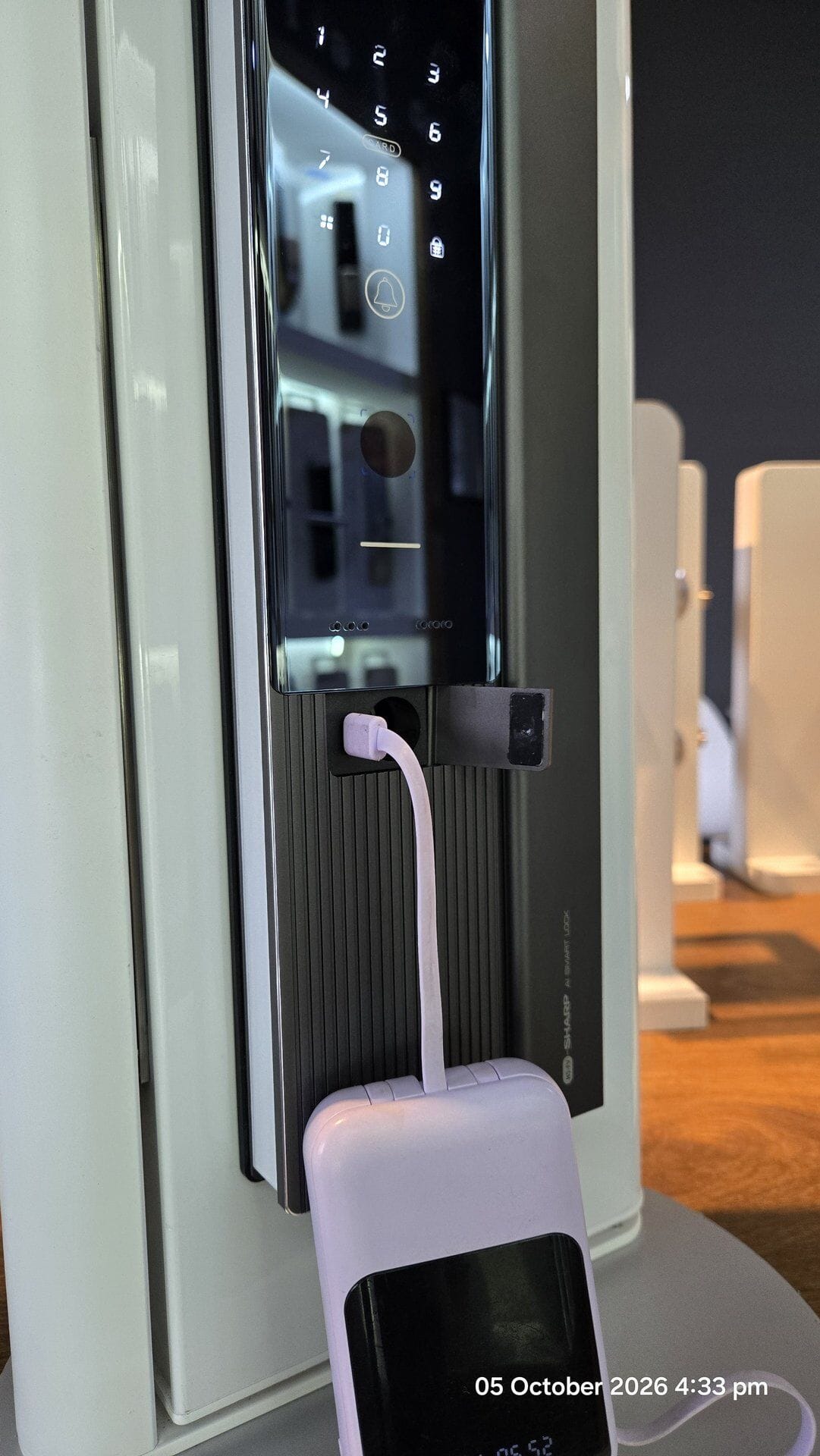
Then the keypad goes dark. But you are not stuck. Many locks have a backup. It can be a metal key, a USB-C slot for a power bank, or two metal points for a 9V battery.
On 28 September 2026, two boys got stuck on a ledge in Yishun, Singapore. It was at a public housing block. Mothership, quoting Shin Min Daily News, reported the story. The family’s electronic door lock had apparently run out of battery. A 13-year-old and his friend climbed out of the stairwell. They tried to get into the flat through a window, but could not. Firefighters from the SCDF brought them down with a ladder. No one was hurt. The family changed the lock’s batteries after that (Mothership).
Flat batteries are a common call for locksmiths. One Singapore locksmith told CNA she gets at least one call a day about faulty smart locks. She said these are mostly because the batteries had failed (CNA).
So how do you get in? It depends on your lock, so check its user guide. Kaadas says its locks flash a light and beep when batteries are low. When they are flat, plug in a Type C power bank, like charging a phone. Or you use the metal key (Kaadas Malaysia). Yale’s guide for its YDM4109 lock shows an emergency key. It also shows an emergency power point for a 9V alkaline battery (Yale YDM4109 manual). EZVIZ says many models have an outside power port for a power bank (EZVIZ).
Practical takeaway: Change the batteries as soon as the lock warns you. Use alkaline batteries, not “heavy duty” ones, which can leak and damage the lock’s circuit board. We explain why in Avoid using “heavy duty” batteries for your digital door lock. Keep the metal key in a safe place you can reach from outside, not inside the house.
What should I check before buying?
Ask one simple question: “If the power and the lock batteries are both gone, how do I open this door?” Then check these five points:
- Runs on its own batteries. Ask what batteries it uses. Ask how it warns you when they are low.
- Opens without the app. PIN, fingerprint or card should open the door with the Wi-Fi off.
- A backup power point. A USB-C slot for a power bank, or 9V battery points. Ask which one it has, and where it is.
- A metal key. This is your last backup if all power fails.
- Test it in the shop. Ask the seller to switch off the Wi-Fi. Then ask to see each way of opening work.
Practical takeaway: If a seller cannot answer these five points clearly, look at another lock.
Closing tip
Once in a while, switch off your Wi-Fi box at the plug for ten minutes. Then open your door in every way your family uses. Also find your lock’s backup power point today. Check what it needs: a 9V battery or a USB-C cable. It is better to learn this on a calm day than in a dark corridor.
Practical takeaway: Not sure how your lock handles a power cut? WhatsApp us at 082-288422, email finelockshop@gmail.com, or visit our showroom at Ground Flr, Lot 4863, Jalan Datuk Amar Kalong Ningkan, 93250 Kuching (3rd Mile). For the bigger safety picture, read Are smart door locks safe? A straight answer from a Kuching locksmith.
Leave a Reply