Category: Uncategorized

  • Can You Put a Smart Lock on a Grill Door? A Kuching Locksmith Explains

    Can You Put a Smart Lock on a Grill Door? A Kuching Locksmith Explains

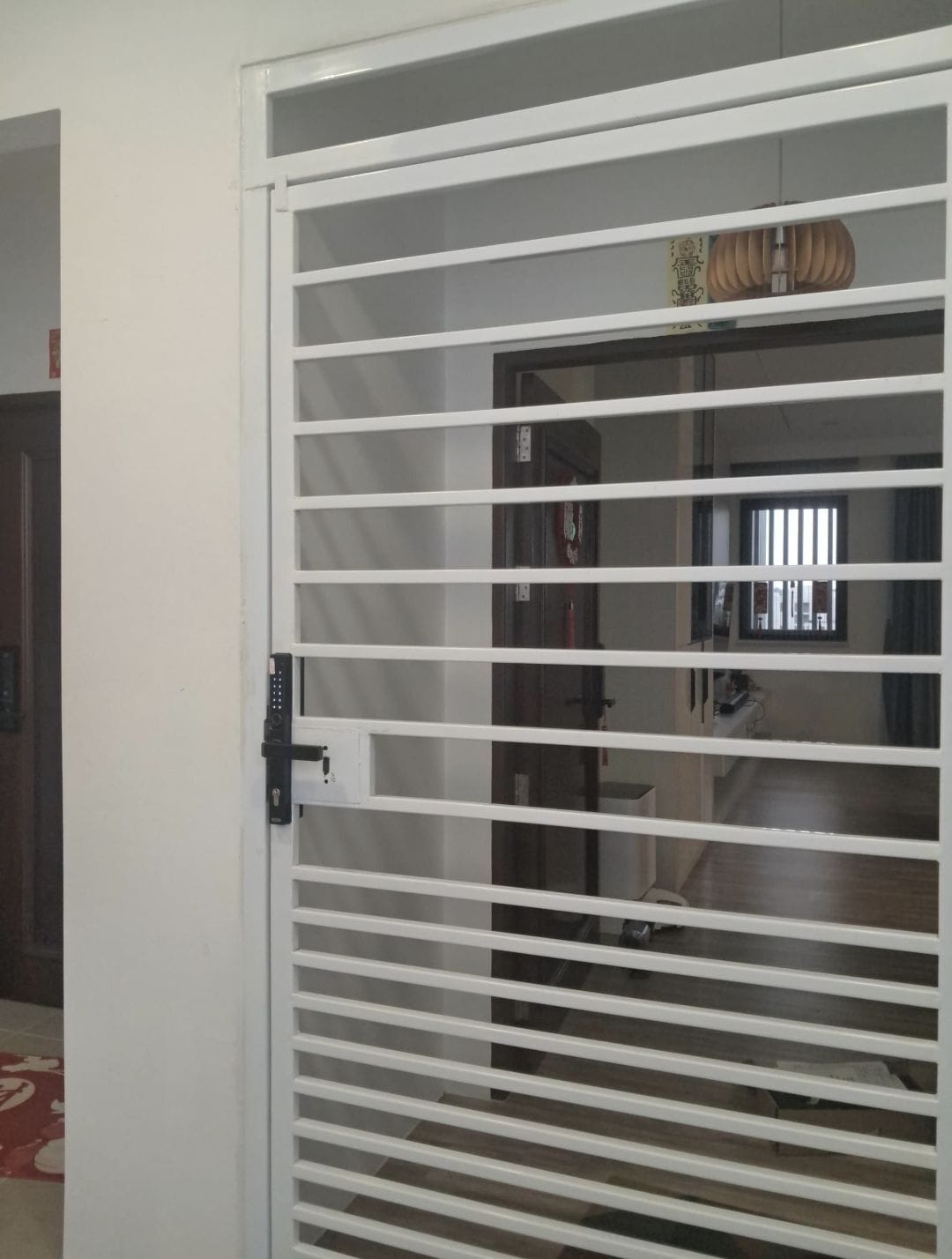
    Yes, you can. But you need a digital lock for grill door use in Malaysia, not a normal indoor lock. It must fit your grill frame and handle rain and sun. It also must not open from an inside button that a thief can reach through the bars.

    In this post, we explain which grill doors can take a smart lock. We look at the problems you may face. And we list what to check before you buy.

    Can you put a smart lock on a grill door?

    Yes. Lock makers sell smart locks made just for grill doors and gates. But a lock made for a wooden door inside the house is a different thing.

    In our experience, the grille door is usually the first door a thief needs to get through. In October 2012, robbers broke into a widow’s house at Taman Genesis, Batu Kawa. Police said they lifted the auto gate off its rail. Then they cut through the front security grille and forced open the main door (Borneo Post). In that case, the grill was the first door the robbers had to beat.

    Lock makers now sell a smart lock for grill door use in Malaysia. Kaadas Malaysia says its gate locks fit flat gates and landed house grilles. It says gates face rain, strong sun and dust. A standard indoor lock “will fail quickly” there (Kaadas Malaysia). Novalock says its NVM 95-G is “designed specifically for metal grille gates” (Novalock). Häfele sells a “Smart Grill Door Lock” too (Häfele Home Malaysia).

    We wrote about this topic years ago too. See our older note, Digital Lock For Grille Door.

    Practical takeaway: Do not move your old indoor smart lock to the grill. Choose a lock that the maker says is for grill doors or gates.

    What kinds of grill doors can take a smart lock?

    Both swing grills and sliding grills can take one. A swing grill opens like a normal door, on hinges. A sliding grill moves sideways on a track. The key is that the lock must fit your frame size and door type.

    Kaadas lists the grills its gate locks fit. These include RUMAWIP, PPR and PR1MA flat gates. They also include sheltered grilles at landed houses (Kaadas Malaysia).

    Frame thickness matters. This is how thick the metal frame of the grill door is, from front to back. Each lock fits only a certain range. Here is what some makers say:

    • Aqara U500 gate lock: 22 to 28 mm. Aqara also says the door and frame must sit flush, which means level with each other (Aqara).
    • Novalock NVM 95-G: 25 to 80 mm (Novalock).
    • Sciener G3R Duo: 35 to 70 mm (Sciener Malaysia).
    • Häfele Quantum Pro: 30 to 90 mm (Häfele Home Malaysia).

    What about a smart lock for sliding grill doors? A sliding door needs a different bolt. The bolt is the metal part that comes out to lock the door. Häfele says its Quantum Pro has a hook bolt “suitable for swing and sliding doors” (Häfele Home Malaysia). A hook bolt is shaped like a hook. It grabs the frame, so the door cannot slide open.

    Practical takeaway: Measure your grill frame thickness with a ruler. Note if it swings or slides. Take a photo of both sides. Bring all three to the shop.

    What problems can happen with a lock on a grill door?

    There are three main problems. Weather, a thief reaching through the bars, and a thief cutting the grill.

    1. Rain and sun. Kuching is very wet. From 1991 to 2020, Kuching got about 4,233 mm of rain a year. It rained on about 210 days each year (WMO climate normals for Kuching). A grill lock sits outside in all of this.

    So look for an IP rating. “IP” means how well the lock box keeps out dust and water. It has two numbers. The first number is for dust. The second number is for water. A 5 for dust means some dust may get in, but not enough to cause problems. A 6 means no dust gets in. A 5 for water means it passed a test with a water hose spray (Eurotech). The guide also warns that IP ratings do not test for sun damage over time (Eurotech).

    For example, Novalock says its NVM 95-G is IP55 (Novalock). Aqara says the outer panel of its U500 is IP65, and the inner panel is IP54 (Aqara).

    2. Reaching through the bars. An ordinary indoor lock can open with a button or handle on the inside. On a grill, a thief can put a hand through the gaps and press it. Aqara says its gate lock needs a fingerprint or key on both sides. It says this removes “the risk of somebody reaching through the gate” (Aqara). Kaadas uses a remote control instead. It says you can unlock the gate from inside your home or your car (Kaadas Malaysia). We also explain this in Digital Lock and Grille.

    3. Cutting. Thieves do not always attack the lock. In June 2012, a 70-year-old Batu Kawah man lost his coin collection. Thieves cut the lock and the security grille, then forced open a side door (Borneo Post). In January 2025, a Johor Baru house was broken into. Police found the grill door damaged and the front door forced open (Malay Mail). A smart lock cannot fix a weak grill. Read more in Padlock & Grille: Common Break-in Method.

    Practical takeaway: Ask three questions. What is the IP rating? How do I open it from inside? Is my grill itself strong enough?

    What should I check before buying?

    Ask one simple question: “Is this lock made for a grill door like mine?”

    Then check these six points:

    1. Made for grills or gates. The maker should say so clearly.
    2. Fits your frame. Check the thickness range against your ruler. Check if it works on swing doors, sliding doors, or both.
    3. An IP rating for the outside part. Ask for the number in writing.
    4. Safe inside opening. From inside, it should need a fingerprint, key or remote. Not just a button any hand can press.
    5. A backup key and emergency power. Aqara and Häfele both list a USB Type-C emergency power point (Aqara; Häfele Home Malaysia). Ask where the batteries go and how you change them.
    6. Works without the app. PIN, fingerprint or card should open it with the Wi-Fi off. See Do smart locks work without Wi-Fi?

    Practical takeaway: If a seller cannot answer these six points clearly, look at another lock.

    FAQ

    Can I install a digital lock on a grill door?\
    Yes. Choose a lock that the maker says is for grill doors or gates. Check that it fits your frame thickness and door type.

    Is a smart lock on a grill door waterproof?\
    Check its IP rating. The second number is for water, and a 5 or 6 means it passed a water spray test.

    Can a thief reach through the grill to open it?\
    Yes, if the lock opens with a simple inside button or handle. Choose one that needs a fingerprint, key or remote from inside.

    Is there a smart lock for sliding grill doors?\
    Yes. Häfele, for example, says its grill lock has a hook bolt for swing and sliding doors.

    Will a smart lock stop thieves from cutting my grill?\
    No. Thieves in Batu Kawah and Johor Baru cut or damaged grills. So the grill itself must be strong too.

    Closing tip

    Before you buy, close your grill door. Stand outside and reach through the bars. Can your hand touch where the inside handle will be? If yes, you need a lock that will not open from a simple inside button. It is better to find this out now than after a break-in.

    Practical takeaway: Looking for a smart door lock in Kuching for your grill? Bring your measurements and photos to Fine Lock Shop. Our showroom is at Ground Flr, Lot 4863, Jalan Datuk Amar Kalong Ningkan, 93250 Kuching (3rd Mile). We are open Mon–Fri 9:00am–5:30pm and Sat 9:00am–2:00pm. You can also WhatsApp us at 082-288422 or email finelockshop@gmail.com. For the bigger safety picture, read Are smart door locks safe? A straight answer from a Kuching locksmith. And if the power goes out, see Will a smart lock still work during a blackout?
  • Will a Smart Lock Still Work During a Blackout? A Kuching Locksmith Explains

    Will a Smart Lock Still Work During a Blackout? A Kuching Locksmith Explains

    On 3 July 2025, at 2.46pm, the power went off in many parts of Kuching. Sarawak Energy said a contractor’s digging damaged two high-voltage underground cables near Green Heights. Parts of BDC, Stampin, Stutong, Batu Kawa and 3rd Mile lost power. So did Sarawak General Hospital, Aeon Mall and The Podium. SESCO, Sarawak Energy’s operations arm, brought power back through another source at 2.58pm (Sarawak Energy).

    A power cut like this raises a fair question. What happens to a smart lock when the power goes out? In this post, we explain what a smart lock power outage really means. What stops. What still works. What to do if the lock battery dies. And what to check before you buy.

    What stops working when the power is out?

    The lock itself does not stop. What stops is the internet link. Your Wi-Fi box at home (the router) runs on house power. When the power goes, your Wi-Fi goes too. So these features can stop:

    • Opening the door with your phone when you are far away
    • Alerts on your phone when someone opens the door
    • Changing codes from far away

    Lock brands say the same thing. EZVIZ is a smart home brand. It says that without Wi-Fi or router power, its app cannot send entry alerts. It also cannot control the lock from far away, until the power comes back (EZVIZ). Schlage, a US lock brand, warns the same. If a smart lock talks through Wi-Fi or phone data, “not all communication or features may be available” in a power outage (Schlage support).

    Practical takeaway: Never make the phone app the only way into your home. We explain more in Do smart locks work without Wi-Fi?

    What still works during a blackout?

    A smart door lock actually runs on its own batteries, not on house power. So in a digital lock blackout, the keypad, fingerprint, card and metal key still work.

    You come home, reach for the fingerprint reader, and the whole building is dark. Is your smart lock dead too? No. Smart locks do not use your home’s electricity. Most run fully on batteries inside the lock. So fingerprints and keypads keep working.

    A European group that sets rules for electronic products wrote a guide for smart door locks. It says a user must be able to lock or unlock the door when power is lost. The lock can do this with batteries or a metal key. The guide also says a locked door should stay locked during a power or internet cut. Only an allowed user should change that (European smart lock guide). In simple words: a smart door lock power cut should not open your door.

    Practical takeaway: Make sure everyone at home can get in without a phone. Give each person their own PIN, fingerprint or card.

    What if the lock battery also runs out?

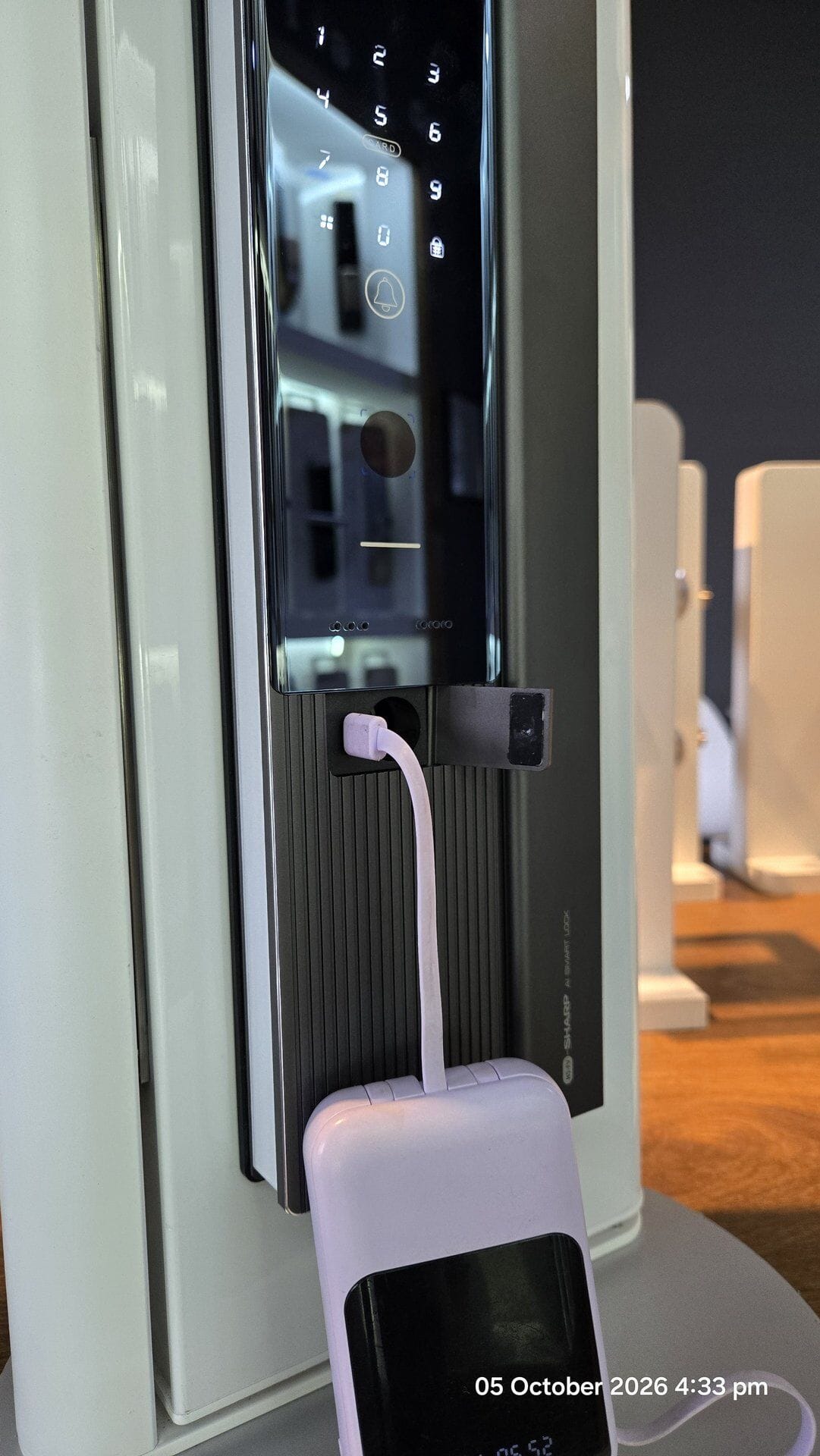
    Then the keypad goes dark. But you are not stuck. Many locks have a backup. It can be a metal key, a USB-C slot for a power bank, or two metal points for a 9V battery.

    On 28 September 2026, two boys got stuck on a ledge in Yishun, Singapore. It was at a public housing block. Mothership, quoting Shin Min Daily News, reported the story. The family’s electronic door lock had apparently run out of battery. A 13-year-old and his friend climbed out of the stairwell. They tried to get into the flat through a window, but could not. Firefighters from the SCDF brought them down with a ladder. No one was hurt. The family changed the lock’s batteries after that (Mothership).

    Flat batteries are a common call for locksmiths. One Singapore locksmith told CNA she gets at least one call a day about faulty smart locks. She said these are mostly because the batteries had failed (CNA).

    So how do you get in? It depends on your lock, so check its user guide. Kaadas says its locks flash a light and beep when batteries are low. When they are flat, plug in a Type C power bank, like charging a phone. Or you use the metal key (Kaadas Malaysia). Yale’s guide for its YDM4109 lock shows an emergency key. It also shows an emergency power point for a 9V alkaline battery (Yale YDM4109 manual). EZVIZ says many models have an outside power port for a power bank (EZVIZ).

    Practical takeaway: Change the batteries as soon as the lock warns you. Use alkaline batteries, not “heavy duty” ones, which can leak and damage the lock’s circuit board. We explain why in Avoid using “heavy duty” batteries for your digital door lock. Keep the metal key in a safe place you can reach from outside, not inside the house.

    What should I check before buying?

    Ask one simple question: “If the power and the lock batteries are both gone, how do I open this door?” Then check these five points:

    1. Runs on its own batteries. Ask what batteries it uses. Ask how it warns you when they are low.
    2. Opens without the app. PIN, fingerprint or card should open the door with the Wi-Fi off.
    3. A backup power point. A USB-C slot for a power bank, or 9V battery points. Ask which one it has, and where it is.
    4. A metal key. This is your last backup if all power fails.
    5. Test it in the shop. Ask the seller to switch off the Wi-Fi. Then ask to see each way of opening work.

    Practical takeaway: If a seller cannot answer these five points clearly, look at another lock.

    Closing tip

    Once in a while, switch off your Wi-Fi box at the plug for ten minutes. Then open your door in every way your family uses. Also find your lock’s backup power point today. Check what it needs: a 9V battery or a USB-C cable. It is better to learn this on a calm day than in a dark corridor.

    Practical takeaway: Not sure how your lock handles a power cut? WhatsApp us at 082-288422, email finelockshop@gmail.com, or visit our showroom at Ground Flr, Lot 4863, Jalan Datuk Amar Kalong Ningkan, 93250 Kuching (3rd Mile). For the bigger safety picture, read Are smart door locks safe? A straight answer from a Kuching locksmith.

  • Do Smart Locks Work Without Wi-Fi? A Kuching Locksmith Explains

    Do Smart Locks Work Without Wi-Fi? A Kuching Locksmith Explains

    In this post, we explain four things. What stops working without Wi-Fi. What still works. What real cases teach us. And what to check before you buy.

    What stops working without Wi-Fi?

    Some features need the internet. They work through the lock company’s computers on the internet. We call these computers “servers”. Without Wi-Fi, these features stop:

    • Opening the door with your phone when you are far away
    • Alerts on your phone
    • Adding or changing codes from far away
    • Voice control, such as Amazon Alexa or Google Assistant

    Schlage is a lock brand. Its help page shows this clearly. Sometimes its Encode Wi-Fi locks lose their Wi-Fi link. Then the app shows “Unreachable”. Schlage says you may not be able to lock or unlock from far away. You may not be able to manage codes in the app. You may also stop getting alerts (Schlage support).

    August is another US smart lock brand. It says the same thing in its product table. Opening from far away “Requires Wi-Fi Connection”. Control by Alexa and Google Assistant also “Requires Wi-Fi” (August: How it works).

    So, do smart locks need Wi-Fi? Only for these extras from far away. The lock itself is a different story.

    Practical takeaway: Before you buy, list the features you really need. Maybe you never open the door for anyone from far away. Then you may not need a Wi-Fi lock at all.

    What still works when the Wi-Fi is down?

    Anything saved inside the lock keeps working. That means PIN codes, fingerprints, cards and the normal metal key. Your phone can also still open some locks when you stand near the door. It uses Bluetooth, a short-distance link between phone and lock.

    This works because many locks save your codes and fingerprints inside the lock, not on the internet.

    Yale’s user guide for its YDM4109 digital lock is one example. It shows how to save up to 100 fingerprints and 100 PIN codes. You do this on the lock itself. The Bluetooth part for the Yale app is extra. You buy it only if you want it. The guide also lists an emergency metal key. It also shows a spot to touch a 9V battery if the lock’s batteries run flat (Yale YDM4109 manual). So this lock is a smart lock without internet from the start. You add the internet link only if you want it.

    Lockly is a smart lock brand from the USA (Lockly). Its help page says your fingerprints are saved on the lock itself. They are saved in a secret code form, not as pictures (Lockly support).

    The August table also shows that every August lock can open by Bluetooth when you stand near it. No internet is needed (August: How it works).

    Europe also has a written guide for smart door locks. It is called ETSI TS 103 815. It says a smart lock must keep working at the door when the internet is lost. It must also go back to normal when the internet comes back (ETSI TS 103 815). In simple words: no internet should not mean no entry.

    Practical takeaway: Give every family member their own PIN or fingerprint on the lock. Then nobody needs only the phone app to get in. Worried about hacking? A lock that never goes online is harder to attack. We explain this in Can a smart door lock be hacked?

    Can a smart lock fail because of Wi-Fi or internet problems?

    Yes, the smart features can fail. App features work through the lock company’s servers. Sometimes those servers stop working. A well-made lock still opens at the door. A badly made lock can stop working at the keypad too. That is why a key or another backup is important.

    On 20 October 2025, Amazon’s internet computer service broke down. It is called Amazon Web Services, or AWS. Thousands of apps use it. When it broke, many apps could not reach their servers. So many smart home products stopped working. The news site Matter Alpha said the problem lasted about 15 hours. It started at one of Amazon’s big computer centres in the USA. Alexa and Ring went offline. But some homes had smart systems that work inside the house, without the internet. Matter Alpha said those homes “were unaffected”. Some SmartThings users could not use their phone app. But their automatic settings at home kept running (Matter Alpha).

    The LockState case in August 2017 was worse. LockState is a smart lock company. It sent a bad software update to its older 6000i Wi-Fi locks. The locks were also sold through an Airbnb program for hosts. About 500 locks were hit. The keypads stopped working. The locks could not connect to the company’s servers again. So the company could not fix them over the internet. Owners had to post part of the lock back for repair. That took 5 to 7 days. Or they could wait 14 to 18 days for a new one. The normal keys still worked (BleepingComputer). One Airbnb host kept his keys in a small key box in the hallway. He told TechCrunch he could still open his doors because of this (TechCrunch).

    The lesson from both cases is simple. You cannot control the internet. A smart door lock offline should still work as a lock.

    Practical takeaway: Choose a lock that opens without the app. Keep the metal key in a safe place you can reach from outside, like that host’s key box. Do you rent out a unit? Plan how guests can get in if the app stops working. Our Airbnb lock notes cover the basics.

    What should I check before buying?

    Ask one simple question: “If my internet is down, how do I open this door?” Then check these five points:

    1. PIN codes saved on the lock. PIN codes and fingerprints should be saved inside the lock, not only on the internet. The Yale and Lockly examples above work like this.
    2. A metal key and/or a 9V emergency battery point. The key is your last backup if the electronic parts fail. LockState owners learned this. The 9V point helps when the batteries are flat.
    3. Bluetooth for using your phone near the door. Bluetooth lets your phone talk to the lock directly, without internet.
    4. No internet needed to unlock. Ask the seller if any way of opening needs the company’s servers. The answer you want is “no”.
    5. Test every way of opening with the Wi-Fi off. Ask the seller to switch off the Wi-Fi. Then ask to see the PIN, fingerprint, card and key working.

    Practical takeaway: If a seller cannot answer these five points clearly, look at another lock.

    Closing tip

    Once in a while, switch off your home Wi-Fi for ten minutes. Then open your door in every way your family uses. If one way fails, you find out on a calm day. Not at midnight in the rain.

    Practical takeaway: Make this test a habit. For the bigger safety picture, read Are smart door locks safe? A straight answer from a Kuching locksmith.

  • Are Smart Door Locks Safe? A Straight Answer from a Kuching Locksmith

    Are Smart Door Locks Safe? A Straight Answer from a Kuching Locksmith

    If you are choosing a front door lock for a Kuching house, a shop, or choosing for a client’s unit, you have probably heard both extremes: “smart locks get hacked in seconds” and “smart locks are safer than keys.” Neither is accurate. You need the whole full story.

    This article sits next to our earlier article on whether a smart lock can be hacked. Here we answer are smart door locks safe, what smart door lock security actually rests on, and how a smart lock vs traditional lock choice looks like when you actually care about your doors as the person who stays behind the door, and not a sales pitch from a salesman’s perspective.

    Are smart door locks safe?

    Short answer: Yes, safe enough for ordinary homes and light commercial use—only if you choose a reputable brand (those that provide continuous updates for both software and firmware), install it on a solid door and frame, and manage PINs, cards, and guest access like you would manage spare keys. But…a smart lock is not magic armour. It is a lock added with electronics. One research used an “unsophisticated cyber attacker–burglar” to attack 18 domestic smart security devices (using 433 MHz radio, Bluetooth, and RFID). Out of 18 smart security device tested, the attack had worked on 16 of them! (89% successfully attacked!)

    Above case is a real published case: University of Hertfordshire researchers (Allen, Mylonas, Vidalis, and Gritzalis) built an “unsophisticated cyber attacker–burglar” model and tested domestic smart security devices over 433 MHz radio, Bluetooth, and RFID. At least one high-criticality attack worked against 16 of 18 devices. Their work produced 14 published CVEs. That is not a Kuching crime wave—it is a lab sample that shows many consumer products fail basic wireless checks. Source: Smart homes under siege…, Computers & Security (2024).

    Europe now treats residential smart door locks as higher-stakes consumer IoT. ETSI TS 103 815 V1.1.1 (January 2024) builds on ETSI EN 303 645 and asks for encrypted, authenticated communications, updatable software, a way to lock or unlock if power dies, and attention to mechanical security—not only the app. A later BLE study of 18 commercial locks found 14 still vulnerable to the attacks examined, with the authors stating the flaws could affect over 20 million users (IEEE TCE, Silent Intruders…). Those numbers describe tested products, not every lock sold in Sarawak. There is no honest public “hack rate” for Malaysian homes.

    Practical takeaway: Buy brands that still update firmware after the purchase, set a unique admin password (and 2FA where offered), keep the door and strike strong, and revoke guest access when people leave.

    Can a smart door lock be hacked?

    Short answer: Yes, in principle. That does not mean every terrace house on your street will be opened from a café Wi-Fi this week. Most published demos need proximity(near distance), special tools, or a weak product—not some random stranger on the street with only a phone number. But still, we want to be honest and tell you that hacking a smart lock is possible.

    In 2025, researchers at UC San Diego (paper at USENIX WOOT) reverse-engineered a very big and prominent Door Lock Brand – Master Lock Bluetooth Deadbolt D1000. They showed a nearby attacker could record a full BLE unlock session and replay it to open the lock again. They also showed a former guest could keep unlocking after access should have been revoked—Master Lock told them the D1000’s access profiles could remain valid for up to nine months because of an earlier clock-related firmware decision, with mitigations planned. Source: Diao et al., No Key, No Problem; summary: https://bit.ly/3VdVrre.

    Such ‘session reuse’ weakness is not unique to one brand. NIST’s entry for CVE-2022-46480 describes incorrect session management on another big brand, Ultraloq UL3 BT (2nd Gen, firmware 02.27.0012): an attacker in Bluetooth range could sniff unlock data and reuse it while the session stayed open. Companion technical report: arXiv:2312.00021. NCC Group’s work on Nuki products found issues that could let someone open or disrupt a lock; Nuki released patches (SecurityWeek coverage).

    Practical takeaway: How to realisticly lower the risk for you: patchable firmware, no shared admin PIN, guest codes that expire, and turning off always-on auto-unlock if you do not need it. Read more: Can a smart door lock be hacked?.

    Smart door lock security: what actually matters

    A smart door lock’s strength is dependent on 3 factor: the software—credentials, radio/app path, and the steel in the door. A good and strong advanced fingerprint reader – yes it is strong, but if the door lock latch is weak, the overall lock is still low security. A boring PINCODE lock, but the locking is a reinforced-multipoint-bolted lock on a solid door, this is be the safer choice.

    Also, the access card. The same Hertfordshire team’s technical report on a big lock brand, Yale’s Conexis L1 (CVE-2023-26941) shows how MIFARE Classic-class RFID tags can be cloned when an attacker gets brief physical proximity to the original card. Their write-up describes recovering keys and duplicating tags in about 20 seconds of access to the original tag (arXiv:2312.00021). Classic’s Crypto-1 cipher has been publicly broken since 2008; correctly configured DESFire EV2/EV3-class AES credentials are far harder to clone (overview).

    Some opinions believe the door lock can only be attacked by someone near the door lock. But distance is not really a deterrent. Attacker can attack a smart door lock even from overseas, even from 1,960KM away. In an ACM WiSec ’22 paper, Staat and colleagues used an analog bluetooth relay and unlocked a Nuki Smart Lock 2.0 while bridging about 65 m between the lock and an authorised phone (DOI 10.1145/3507657.3528536; arXiv:2202.06554). On the access-control side, researchers relayed HID Seos over the public Internet and unlocked a lab door with a card about 1,960 km away (ePrint 2023/450). Fox-IT’s advisory is blunt: treat passive proximity unlock with caution; prefer a deliberate tap/button, stronger ranging (e.g. UWB where available), or disable auto-unlock (Fox-IT).

    Fact with source: ETSI’s smart-lock vertical explicitly lists credential copy, replay, and relay among credential-related threats, and ties cyber rules to mechanical building-hardware practice (TS 103 815, threat notes and Annex C).

    Takeaways: For day-to-day smart door lock security in Kuching, we still care more about bolt throw, strike fit, humidity-tolerant hardware, and whether parts will still be available in five years—see why some locks are so cheap and five ways to tell a smart lock is good. ETSI also expects you can lock or unlock if power is lost (TS 103 815, SDL 5.9-1)—battery contacts and/or a mechanical key override. A weak cylinder becomes the weak link no matter how good the fingerprint module looks (fingerprint reader differences).

    Smart lock vs traditional lock

    Neither wins by default. A quality traditional cylinder on a reinforced door often beats a no-name “smart” lock with weak cards and no updates. A durable smart lock with deletable credentials, honest logs, and a proper install often beats a worn knobset and a key under the mat.

    Look again at the Master Lock D1000 findings: convenience features (temporary guest access, audit logs over BLE/phone) became attack surfaces when session handling and revocation were weak (WOOT paper). Traditional keys do not have that exact failure mode—but they also cannot revoke a copied key without a rekey. Different tools, different messes.

    ETSI frames residential smart locking as needing both cyber and mechanical controls (TS 103 815). Traditional mechanical locks have almost no internet attack surface; they still fail through picking, drilling, worn pins, or broken keys depending on the cylinder and bolt. Smart locks add PIN/card/phone revocation and optional entry logs—and add BLE, Wi-Fi, apps, and cloud paths that quality and patching decide. If you want mechanical-only options, start here: high-security mechanical door locks.

    What to check before you buy (Kuching homeowners & contractors)

    Short answer: Match the lock to the door, the people who need access, and who will service it in five years from now.

    1. Door type — Timber, metal, multipoint security door? Wrong body equals a weak install (smart locks on security/metal doors).
    2. Who comes and goes — Family only, staff codes, or short-term rental? Plan code rotation for Airbnb-style use (Airbnb lock notes).
    3. Brand support — Will firmware and spare parts still exist? (Korea-made durability; repair after years).
    4. Connectivity — Fully offline digital vs Bluetooth vs Wi-Fi. More connectivity means more account responsibility.
    5. Credentials — Deletable PINs and cards; ask what RFID tech the cards use; treat passive auto-unlock as optional.
    6. Backup — Mechanical key and/or external battery contacts; spare batteries on the shelf.
    7. Install — DIY only if the door already matches; mortise and security doors are easy to get wrong (DIY caveats).

    More selection context: How to choose the right smart door lock.

    Soft next step

    If you want a second pair of eyes on a model—or an install that respects latch, strike, and multipoint hardware—talk to Fine Lock Shop. We work with Kuching homeowners, shops, and project partners (contractors and interior designers). Browse https://bit.ly/4AFyVrE and smart digital door locks, or visit the showroom and ask us to explain trade-offs in plain language. We will not invent a “hack-proof” promise. We will help match risk, door, and budget honestly.

  • Using Card to “Slot-Open” a Door Lock is actually a Myth. Locksmith’s Insider Secret

    Using Card to “Slot-Open” a Door Lock is actually a Myth. Locksmith’s Insider Secret

    Kuching Locksmith Knowledge Sharing
    By Fine Lock Shop

    When you accidentally locked the door, and left the key still inside, what is the 1st t hing that you will think of?

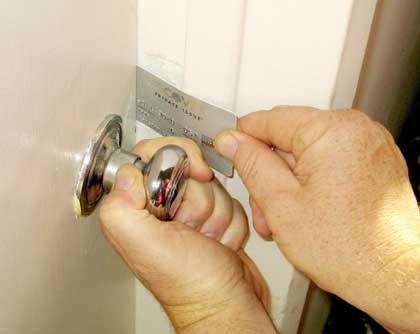
    Try use a card to ‘slot’ open the lock. Actually everyone that i met, up to now, have all thought that the knob type of door lock can be just card-slot to open the door. And this is actually ‘fake news’.

    Knob lock or cylindrical lock, are designed to be not slot-able. Whenever you seen or heard people manage to use card to slot open a lock, is actually due to: IMPROPER INSTALLATION. When the lock is not properly installed, it will expose a weakness which is slot-able.

    Let me teach you now how to properly install a knob lock.

    First you need to understand that cylindrical latch, has 2 parts: The Latch itself, and a Deadlatch.

    This must be the first time you have heard of deadlatch. Maybe this is the first time you notice it. But it’s extremely important. If the deadlatch is pressed when the door is closed, the latch will be ‘deadened’. Hence the word DEAD-latch. So in a proper installation, the deadlatch is always pressed and can’t go into the door-frame hole.


    When you (or someone else) do the installation, you need a hole at the door frame, for the latch to go in:

    When you are measuring this hole and aligning this hole, the deadlatch CANNOT go into this hole, as shown below:


    Another photo below here to show you the 99% of installation that we saw (the wrong way)

    The main culprit is at the door frame hole (strike hole). just make sure that the deadlatch won’t go into hole. And this will guarantee your installation to be of higher security, and no one can just swipe a card to go into your house/ room.

    Lets Keep Our Families Safe.

  • Why Some Locks Are So Cheap?

    Why Some Locks Are So Cheap?

    You cannot be thinking that an RM500 lock, and an RM1000 locks to be of the same quality right? I have to call that thinking as stupid. This is simply not logic (unless you’re scammed)

    There has to be some compromise, some cut-corners, something is lacking. From our experience, in the industry of smart door lock, the compromises are….

    No 1.
    This is the most often, 95% is using this method to cut cost: Using cheaper Material (Use plastic instead of steel body). This makes the lock to be very not durable, very not safe and not secure. Cepat rosak. Few client that called us for “lock-out” case is this. Cheap lock, plastic components simply fail

    No.2
    Cheaper motherboard and processor. All smart door locks need a microprocessor inside. Different microprocessors have different speed, accuracy, capabilities and quality. Not sure if you heard, but 3-5 years ago, it’s discovered that almost all unbranded smart lock (it’s a smart lock, but there is no brand on the lock) can be opened using a Tesla Coil (a black electrical interference devices). This is a bypassing method. Whereas branded and higher priced locks can’t be opened using the same coil. 

    No.3
    The unlocking system. Although from user perspective all smart lock looks the same during unlocking, there are actually different internal mechanism. Established brand usually uses electronic unlock (this is the safer way), while cheaper lock uses latches unlocking (this can be bypassed a lot easier). Latch unlocking is so much simpler, so much cheaper, and so much easier-to-bypass as well. 

    Whether to buy a cheap lock or expensive lock, we have no say as we don’t know the purpose. If you simply want to lock a room that is extremely seldom used and nothing important inside, then perhaps you don’t need to spend so much (just get a cheap one lah!). But if it’s an important door, we highly recommend something more established.

  • 5 Ultimate Ways To “Tell” a Smart Lock Is Good

    This is the most important guide that we can simplify to help everyone make a good decision on how to choose a good door lock (especially smart lock).

    1. Weight:

    – Lightweight = cheaper and more fragile material. Short-lived lock.

    – Tensile strength is the most important aspect in choosing lock material. From worst to best is: Aluminium Alloy, Zinc Alloy, Brass, Stainless Steel.

    – So can you guess correctly which is the lightest to the heaviest?

    2. Brand:

    – Branded = long reputable company. Example Samsung, Kaadas, Philips, etc. Their spare part is the easiest to find and available. Quality and security are also assured.

    – No brand (or some brand that you never heard of, not even got a company website), we’ve tried many. When problem comes, no spare part available. No matter how sweet is the promise made during purchase

    3. Time in market:

    – The time of the company in the market also important. Experienced company (ehem ehem, like us,) sold thousands of lock for a span of 10+ years, we already know which model and which type is good and reliable. So not only the technical aspect, but knowledge of the product, brands, and models are extensive. A newbie usually only sell you their own product and might badmouth other people’s brand/ product

    4. Warranty:

    – This of course is very straight forward, if a factory/ seller dare to give long warranty, then he must be confident in his own product.

    5. Your homework: Feedback

    – Combine all 4 factor above, do your homework and research. Also ask around and read testimonial/ ratings from other customer, then you will know.

    If you do all 5 properly, you will undoubtedly got a reliable and long lasting door lock

  • DIY Smart Door Lock Installation: A Step-by-Step Guide

    DIY Smart Door Lock Installation: A Step-by-Step Guide

    Installing a smart door lock can enhance the security and convenience of your home. If you’re a homeowner looking to upgrade your door lock on your own, this step-by-step guide will walk you through the process. With some basic tools and careful execution, you can successfully install a smart door lock and enjoy the benefits it brings. Let’s dive into this brief DIY smart lock installation process.

    This guide only for those who has an existing lock on their door and wish to change or upgrade it to a smart door lock version. We strongly discourage you to DIY if it’s a completely new door.

    Step 1: Check your existing/ old lock type. If your old lock is a cylindrical knob/ tubular lever, then you should get a Tubular Lever Smart Lock. If it’s a deadbolt on your door, you should get a smart deadbolt lock to replace it. It might get more complicated if it’s a mortise lock, hence for mortise lock we advise best to leave it to the professionals.

    Step 2: Gather the Necessary Tools and Equipment Before starting the installation, ensure you have the following tools handy:

    • Screwdriver (Phillips or flathead, depending on your lock)
    • Tape measure
    • Pencil or marker
    • Level
    • Battery or power source (if applicable)

    Step 3: Choose the Right Smart Door Lock Select a smart door lock that suits your needs and is compatible with your existing lock type. Consider factors such as connectivity options (Wi-Fi, Bluetooth, or both), compatibility with smart home systems, and security features.

    Step 4: Prepare Your Door Before removing the existing lock, make sure your door is clean and free from any obstructions. Remove the old lock and carefully follow the manufacturer’s instructions to prepare the door for the smart lock installation.

    Step 5: Install the Smart Lock Assembly Follow these general steps, but always refer to the specific instructions provided by the smart lock manufacturer:

    1. Install the latch and strike plate: Attach the latch and strike plate to the door frame using screws provided.

    Image: Install the latch and strike plate

    1. Install the exterior assembly: Insert the exterior assembly into the designated hole on the door’s exterior side. Ensure it aligns properly and tighten the screws to secure it in place.

    Image: Install the exterior assembly

    1. Install the interior assembly: Place the interior assembly onto the interior side of the door and connect it to the exterior assembly. Secure the two parts using the provided screws.

    Image: Install the interior assembly

    1. Test the lock: Ensure the lock functions smoothly by testing the lock/unlock mechanism and confirming that the door aligns properly with the frame.

    Step 6: Connect and Set Up the Smart Lock Depending on the smart lock model, you may need to follow specific instructions to connect the lock to your smartphone or smart home hub. Install the required app on your device, create an account if necessary, and follow the app’s instructions to pair and set up the lock.

    Step 7: Test and Troubleshoot Once the installation is complete, test the smart lock to ensure it works as intended. Check all features, such as keyless entry, remote access, and any additional functionalities offered by your specific lock. If you encounter any issues, consult the troubleshooting section of the manufacturer’s guide or reach out to their support team.

    By following this step-by-step guide, you can successfully install a smart door lock and enjoy the convenience and security it provides. Remember to always refer to the specific instructions provided by the manufacturer of your smart lock for the most accurate and detailed installation process. Upgrade your home’s security and embrace the benefits of a DIY smart lock installation today.

    Finally, you can get a copy of all our available locks at this webpage: Fine Lock Shop – Smart Digital Door Lock Kuching

  • The Benefits of Installing Smart Door Locks

    The Benefits of Installing Smart Door Locks

    In today’s digital age, technological advancements have revolutionized various aspects of our lives, including home security. One such innovation that has gained immense popularity is the smart door lock. Smart door locks offer a range of benefits that go beyond traditional lock and key systems. In this article, we will explore the advantages of installing smart door locks, including increased security, convenience, and remote access.

    Smart door lock being installed with keyless entry and remote access
    1. Enhanced Security:
      Smart door locks provide an advanced level of security compared to traditional locks. Unlike physical keys that can be lost or duplicated, smart locks offer keyless entry options, eliminating the risk of unauthorized access. Smart locks utilize cutting-edge technology, such as encryption and authentication methods, to safeguard your home. Some models even incorporate biometric features like fingerprint or facial recognition for added security.
    2. Convenience and Ease of Use:
      Gone are the days of fumbling through pockets or bags to find your keys. With smart door locks, you can say goodbye to the hassle of traditional keys.
      These locks allow for convenient keyless entry through various means, including PIN codes, smartphone apps, or even voice commands. You can also grant temporary access to family members, friends, or service providers remotely, without the need for physical keys or being present at home.
    3. Remote Access and Control:
      One of the most significant advantages of smart door locks is the ability to control and monitor your door remotely. Through a mobile app or web portal, you can lock or unlock your door from anywhere, at any time. This feature is particularly beneficial when you need to grant access to someone while you’re away or if you forgot to lock your door before leaving. Some smart locks also provide real-time notifications, alerting you whenever someone enters or exits your home.
    4. Integration with Smart Home Systems:
      Smart door locks can seamlessly integrate with other smart home devices and systems, offering a comprehensive home automation experience. You can connect your smart lock with voice assistants like Amazon Alexa or Google Assistant, allowing you to control your lock using voice commands. Integration with security systems enables automatic locking when the system is armed, providing an additional layer of protection.
    5. Activity Monitoring and Access Logs:
      Many smart door locks come with activity monitoring features, allowing you to track who enters and exits your home and at what time. Access logs provide a record of each entry, giving you peace of mind and the ability to review any suspicious or unauthorized activities. This feature can be particularly valuable for monitoring the comings and goings of children, housekeepers, or maintenance personnel.

    Installing smart door locks can significantly enhance your home security while offering unparalleled convenience and control. With their advanced features, such as keyless entry, remote access, and integration with smart home systems, smart door locks have become an essential component of modern living. By opting for smart door locks, you can enjoy the peace of mind that comes with knowing your home is secure and accessible at your fingertips.

    Remember, investing in quality smart door locks from reputable manufacturers will ensure you reap the full benefits and enjoy a seamless experience of enhanced security and convenience.

    Do you want to know all the different types of models and all sorts of opening methods? You can download a free full catalog at Fine Lock Shop – Smart Digital Door Lock Kuching

    If you rather watch a video explaining all the different models, go to PRODUCT – Smart Digital Door Locks – Fine Lock Shop – Smart Door Lock & Locksmithing

  • How to Choose the Right Smart Door Lock for Your Home

    How to Choose the Right Smart Door Lock for Your Home

    Choosing the perfect smart door lock for your home is a crucial decision that combines security, convenience, and technology. With an array of options available, it’s important to understand the different types of smart door locks and consider essential factors when making your selection. In this article, we will explore the world of smart door locks, provide valuable insights, and guide you in choosing the best option to meet your specific needs.

    1. Understanding Smart Door Locks: Smart door locks offer a wide range of features and functionalities that enhance the security and accessibility of your home. These locks utilize advanced technology such as Wi-Fi, Bluetooth, or Wifi to connect with your smartphone or other smart devices. Let’s explore the different types of smart door locks:
    • Keyless Keypad Locks: These locks allow you to enter a unique PIN code or card to unlock the door, eliminating the need for physical keys.
    • Bluetooth-Enabled Locks: With Bluetooth connectivity, these locks offer convenient access through your smartphone when you’re within range.
    • Wi-Fi-Enabled Locks: These locks provide remote access and control, allowing you to lock or unlock your door from anywhere using a smartphone app.
    • Biometric Locks: These locks use fingerprint recognition technology to grant access, providing a high level of security and convenience.
    1. Factors to Consider When Choosing a Smart Door Lock: Now that you understand the types of smart door locks available, here are some important factors to consider when selecting the right one for your home:
    • Security Features: Look for locks with robust security features such as encryption, tamper alerts, and anti-pick technology to ensure the safety of your home.
    • Compatibility: Check if the smart lock is compatible with your existing door and lock hardware. Some locks require specific door types or modifications for installation. I can’t guide your in detail here, as too many conditions of the door need to be considered such as material, stine width, thickness, grille distance etc.
    • Integration with Smart Home Systems: If you have a smart home setup, ensure that the smart lock can seamlessly integrate with your existing devices and platforms.
    • Power Source: Consider the power source of the lock. Some locks operate on batteries, while others can be hardwired into your home’s electrical system.
    • User-Friendly Interface: Opt for locks with intuitive interfaces and easy-to-use mobile apps for a hassle-free experience.
    • Lock material: It might come to your surprise, but smart lock comes in many material. Cheapest one will use plastic. Of course it will not be durable (but it’s cheap!). Other material arranged by hardness (and increasing cost too) will be aluminium alloy, zinc alloy, copper, and stainless steel.
    • Budget: Determine your budget and explore options within that range, considering the features and benefits offered by each smart lock.
    1. Additional Tips for Choosing the Right Smart Door Lock: To further assist you in making an informed decision, here are a few additional tips to keep in mind:
    • Read reviews and ratings from reputable sources and other homeowners to gain insights into the performance and reliability of the smart locks you are considering.
    • Consider the warranty and customer support provided by the manufacturer. A reliable warranty and accessible customer support can be invaluable in case of any issues.
    • Seek professional installation if you’re not confident in your own abilities. Proper installation ensures optimal performance and security.

    Choosing the right smart door lock is a critical step in enhancing the security and convenience of your home. By understanding the different types of smart locks available and considering factors such as security features, compatibility, integration with smart home systems, and budget, you can confidently select the best smart door lock to meet your specific needs. Stay informed, compare options, and make a well-informed decision to enjoy the benefits of a secure and technologically advanced home.

    And one more, you will need to know all your choices in order to make wise comparison. I will include the link below where you can download all digital lock available in Kuching together with the price for you. Transparent enough?


    https://home.finelockshop.com/